 Пенные тампоны для чистых помещений, полиэфирные тампоны, Производитель комплектов для чистки принтера – Медитек
Качество отпечатков может ухудшиться из-за пыли, посторонние вещества, остатки клея, или другие загрязняющие вещества, которые могут накапливаться внутри или на головке принтера..
Когда он становится грязным, follow these steps to clean the print head:
Caution
- Always ensure the printer is powered off before cleaning.
- Since the print head can become very hot during printing, if you plan to clean it, turn off the printer and wait approximately 2~3 minutes before beginning.
- When cleaning the print head, be cautious not to touch the heated portion. → Printer heads are vulnerable to damage from static electricity and other sources.
- Take care to avoid scratching or damaging the print head in any way.
Cleaning the Print Head
- Open the paper cover and use a ручка для чистки печатающей головки to gently clean the head, moving from the center outwards.
- После очистки, refrain from using the printer until any alcohol used in the cleaning process has completely evaporated (approximately 1~2 minutes), and the printer is fully dry.
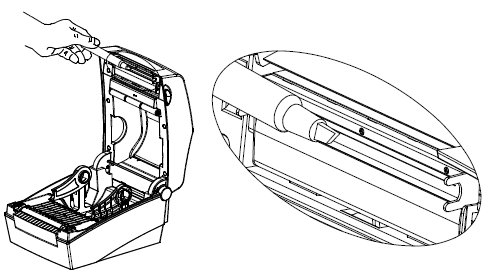
※ Рекомендуется выполнять эту процедуру очистки каждый раз при замене рулона бумаги, чтобы сохранить качество печати и предотвратить ухудшение качества..