 مسحات رغوة غرف الأبحاث, مسحات بوليستر, الشركة المصنعة لمجموعة أدوات تنظيف الطابعة | ميديتك
بعد الاستخدام لفترة طويلة, قد تتراكم الأوساخ مثل الحبر في الطابعات النافثة للحبر, تراب, والحطام على رأس الطباعة, مما يؤدي إلى انخفاض جودة الطباعة. باستخدام أ مسحة تنظيف الرغوة يمكنه إزالة هذه الشوائب بشكل فعال وتحسين جودة الطباعة.
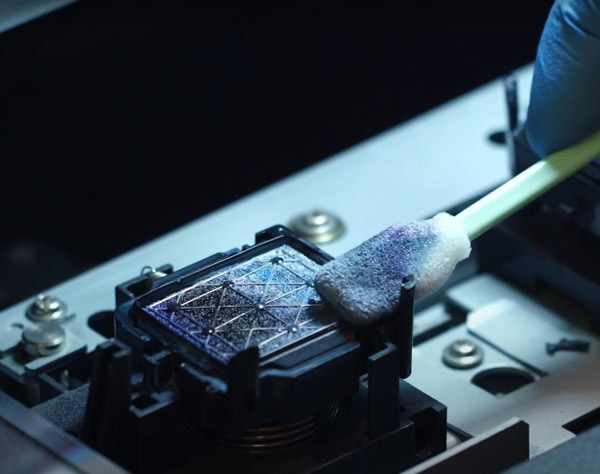
فيما يلي خطوات تنظيف الطابعة النافثة للحبر باستخدام مسحة التنظيف الرغوية:
قم بإيقاف تشغيل الطابعة وافصل سلك الطاقة. حدد موقع رأس الطباعة على الطابعة, مع الحرص على عدم لمس المكونات الأخرى أو تحريكها.
خذ مسحة تنظيف رغوية نظيفة واغمسها في الماء المقطر أو محلول تنظيف مخصص. لا تستخدم الماء النقي أو المحاليل التي تحتوي على الكحول, لأنها قد تلحق الضرر برأس الطباعة.
امسح سطح رأس الطباعة برفق باستخدام المسحة. يجب الحرص على عدم ممارسة الكثير من الضغط, لأن هذا قد يؤدي إلى تلف رأس الطباعة. يمكنك تكرار هذه العملية عدة مرات حتى يصبح سطح رأس الطباعة نظيفًا.
استخدم مسحة تنظيف أخرى لتنظيف الحبر والغبار حول رأس الطباعة. إذا كانت هناك بقع مستعصية, يمكنك استخدام محلول تنظيف مخصص أو ورق تنظيف.
انتظر حتى يجف رأس الطباعة تمامًا, ثم أعد إدخاله في الطابعة وقم بتشغيله. تحقق مما إذا كانت جودة الطباعة قد تحسنت.
تجدر الإشارة إلى أن تنظيف الطابعة النافثة للحبر يتطلب عناية خاصة, لأن التشغيل غير السليم يمكن أن يؤدي إلى تلف رأس الطباعة. إذا لم تكن متأكدًا من كيفية تنظيف الطابعة بشكل صحيح, ارجع إلى دليل مستخدم الطابعة أو اتصل بفريق الدعم الفني بالشركة المصنعة.