 Cleanroom Foam Swabs, Polyester Swabs, Printer Cleaning Kit Manufacturer | MediTech
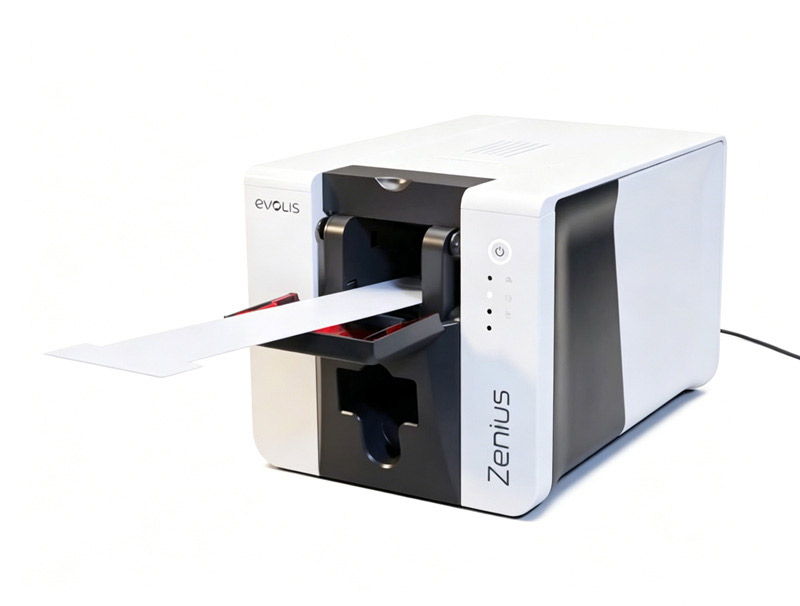
Keeping your Evolis Zenius card printer clean is essential for maintaining excellent print quality, extending printhead life, and reducing unexpected downtime. Dust, adhesive residue, and card debris can accumulate inside the printer over time, causing print defects, card feeding issues, and premature wear.
In this guide, you’ll learn how to clean an Evolis Zenius printer, when maintenance should be performed, and which cleaning supplies provide the best results.
Why Is Evolis Zenius Cleaning Important?
Regular maintenance is one of the most important factors in ensuring reliable card printing performance. During daily operation, PVC cards generate microscopic dust particles that accumulate on the cleaning roller, printhead, feed rollers, and internal components.
Without routine cleaning, users may experience:
- Poor print quality
- White lines or missing colors
- Card feeding errors
- Card jams
- Ribbon synchronization problems
- Reduced printhead lifespan
- Increased maintenance costs
According to the Evolis maintenance recommendations, routine cleaning should be performed every time the ribbon is replaced, and the printer’s cleaning warning should never be ignored because it may affect printhead warranty coverage.
When Should You Clean an Evolis Zenius Printer?
For optimal performance, follow these maintenance intervals:
Routine Cleaning
- Perform whenever the ribbon is replaced
- Recommended every 1,000 printed cards
- Uses an adhesive cleaning card to remove dust from transport rollers
Printhead Cleaning
- Clean every ribbon replacement
- Use an IPA cleaning swab or cleaning pen
- Removes ink residue and contaminants from the printhead
Advanced Cleaning
- Perform every five routine cleaning cycles
- Cleans feed rollers, magnetic encoder, and internal transport system
- Uses T-shaped cleaning cards and adhesive cleaning cards
Following this maintenance schedule helps maximize print quality while extending the printer’s service life.
How to Perform Evolis Zenius Routine Cleaning
Routine cleaning removes dust and debris from the card path and cleaning roller.
Step 1: Remove the Ribbon
Open the printer cover and remove the installed ribbon cartridge.
Step 2: Set Card Thickness to Maximum
Adjust the thickness lever to the MAX position.
Step 3: Empty the Card Feeder
Remove all cards from the feeder before cleaning.
Step 4: Activate Cleaning Mode
Press the cleaning button according to the printer instructions until cleaning mode starts.
Step 5: Insert the Adhesive Cleaning Card
Remove the protective film and insert the adhesive cleaning card into the manual feeder with the adhesive side facing upward.
The printer automatically pulls the card through the transport rollers, removing accumulated dust and debris.
After cleaning finishes, the card is automatically ejected.
How to Clean the Evolis Zenius Printhead
The printhead is the most delicate component inside the printer.
A dirty printhead often causes:
- Horizontal white lines
- Missing colors
- Blurry printing
- Uneven image quality
Before cleaning:
- Turn off the printer
- Disconnect the power cable
- Never touch the printhead with your fingers
Use an IPA cleaning swab or printhead cleaning pen to gently wipe the printhead from left to right.
Allow the alcohol to evaporate completely before printing again.
Advanced Evolis Zenius Cleaning
After several routine cleaning cycles, a deeper cleaning is recommended.
Advanced cleaning removes contamination from:
- Feed rollers
- Card transport rollers
- Magnetic encoder
- Cleaning roller
- Internal card path
A T-shaped cleaning card is inserted first, followed by an adhesive cleaning card to remove loosened contaminants.
This deeper maintenance significantly improves long-term printer reliability and print consistency.
Common Print Quality Problems Caused by Dirty Printers
Many printing problems are actually caused by contamination rather than hardware failure.
| Problem | Possible Cleaning Solution |
|---|---|
| White horizontal lines | Clean printhead |
| Blurred images | Clean printhead and rollers |
| Card jams | Clean feed rollers |
| Ribbon synchronization issues | Clean transport system |
| Small spots on cards | Remove dust using adhesive cleaning card |
| Feeding problems | Clean cleaning roller and feeder |
Routine maintenance often resolves these issues without requiring expensive repairs.
Best Cleaning Supplies for Evolis Zenius Printers
Using high-quality cleaning products ensures safe maintenance without damaging sensitive printer components.
MediTech offers professional Evolis-compatible cleaning kits designed for Zenius, Primacy, Primacy 2, and other Evolis card printers.
Popular products include:
- Evolis Compatible Cleaning Cards
- IPA Printhead Cleaning Pens
- IPA Cleaning Swabs
- Adhesive Cleaning Cards
- Complete Evolis Cleaning Kits
- Roller Cleaning Cards
These products effectively remove dust, adhesive residue, ink buildup, and card debris while helping extend printhead life and reduce maintenance costs.
Whether you perform routine or advanced maintenance, MediTech cleaning supplies provide an economical alternative for keeping your Evolis Zenius printer operating at peak performance.
For businesses with frequent card printing workloads, keeping cleaning supplies on hand helps minimize downtime and maintain consistent print quality.
Visit MediTech’s Evolis-compatible cleaning supplies collection to find the right maintenance kit for your printer:
https://www.meditechswab.com/product-category/card-printer-cleaning-supplies-and-kit/evolis-compatible-cleaning-kit/