 Cleanroom Foam Swabs, Polyester Swabs, Printer Cleaning Kit Manufacturer | MediTech
Thermal printers are widely used for printing receipts, labels, tickets, barcodes, shipping documents, and other business-critical materials. Because these printers often operate continuously, dust, paper debris, ink residue, and other contaminants can gradually accumulate along the paper path and on internal components.
Regular maintenance with a thermal printer cleaning card can help remove these contaminants and keep the printer operating smoothly. For businesses that depend on consistent printing performance, using the right cleaning card is a simple way to support print quality and reduce avoidable maintenance issues.
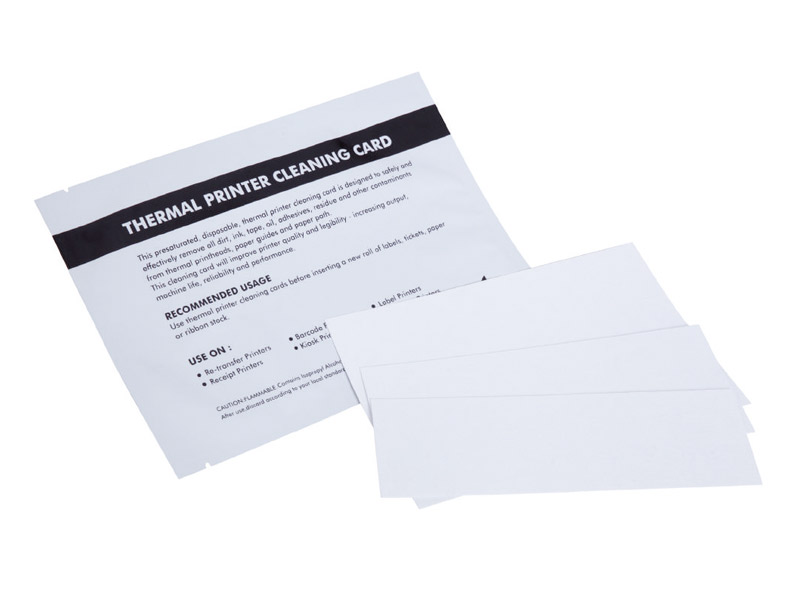
What Is a Thermal Printer Cleaning Card?
A thermal printer cleaning card is a specially designed cleaning tool that passes through the printer’s paper path to remove accumulated dirt and debris.
Unlike manual cleaning methods that may require opening the printer, a cleaning card provides a convenient preventive-maintenance approach. The card is inserted into the printer in a similar way to regular media and passed through the appropriate paper path.
Why Is Thermal Printer Cleaning Important?
Thermal printers can collect contaminants during normal operation. Paper particles, dust, and other residues may build up as printing volume increases.
Regular cleaning can help:
- Remove dirt and debris from the printer’s paper path
- Support consistent print quality
- Reduce contamination-related printing problems
- Maintain smoother printer operation
- Reduce unnecessary downtime
- Make routine preventative maintenance easier
For businesses operating multiple printers, incorporating cleaning cards into a regular maintenance schedule can also make printer care more consistent.
How Does a Thermal Printer Cleaning Card Work?
Using a cleaning card is straightforward.
1. Prepare the Printer
Follow the printer manufacturer’s maintenance instructions and remove any printing media as required.
2. Insert the Cleaning Card
Place the cleaning card into the printer’s paper path according to the printer’s operating procedure.
3. Run the Card Through the Printer
Allow the printer mechanism to feed the card through. As the card moves through the paper path, its cleaning surface contacts relevant internal areas and helps lift away accumulated contaminants.
4. Remove and Dispose of the Used Card
After the cleaning cycle, remove the card and dispose of it appropriately. Allow any applicable surfaces to dry before returning the printer to normal operation.
MediTech’s cleaning card is designed for quick, convenient preventative maintenance without requiring extensive printer disassembly.
How to Choose the Right Thermal Printer Cleaning Card
Before purchasing a cleaning card, consider the following factors:
Printer Type
Determine whether the equipment is a direct thermal printer, thermal transfer printer, bill acceptor, check scanner, or another compatible device.
Card Dimensions
The card must be compatible with the printer’s paper path. MediTech provides multiple sizes, including 2″ × 4″, 2″ × 6″, and 4″ × 6″ formats.
Cleaning Solution
For applications requiring solvent-based cleaning, a pre-saturated 99.9% IPA cleaning card provides a convenient ready-to-use option.
Packaging
Individually foil-packed cleaning cards help keep each card protected before use.
OEM/ODM Requirements
If you are a distributor or printer-maintenance supplier, private labeling, customized packaging, and product specifications may be important. MediTech provides OEM/ODM services for its cleaning card products.
Keep Your Thermal Printers Clean with MediTech
Regular preventive maintenance is an important part of maintaining reliable thermal printing equipment. A properly sized thermal printer cleaning card provides a simple way to help remove accumulated contaminants without complicated cleaning procedures.
MediTech’s Thermal Printer Cleaning Card combines a compact PVC and non-woven construction with 99.9% IPA and individual foil packaging, providing a convenient solution for routine printer maintenance.
If you are looking for thermal printer cleaning cards, IPA printer cleaning supplies, printhead cleaning tools, or customized OEM/ODM cleaning products, contact MediTech for product information, samples, and customized solutions.