 Hisopos de espuma para salas blancas, Hisopos de poliéster, Fabricante de kits de limpieza para impresoras | MediTech
Mantener limpia su impresora de tarjetas de identificación Magicard Rio Pro es esencial para mantener una alta calidad de impresión, extender la vida útil de la impresora, y reducir el costoso tiempo de inactividad. Polvo, residuo de adhesivo, restricción de tarjetas, y las partículas de la cinta pueden acumularse dentro de la impresora con el tiempo, afectando la alimentación de la tarjeta, calidad de imagen, y rendimiento del cabezal de impresión.
Magicard recomienda limpiar la impresora Rio Pro cada vez que reemplace la cinta de película colorante.. En esta guía, Lo guiaremos a través del proceso de limpieza completo y le recomendaremos productos de limpieza profesionales de MediTech para ayudarlo a mantener su impresora funcionando al máximo rendimiento..
Por qué es importante la limpieza periódica del Magicard Rio Pro
El mantenimiento de rutina ayuda:
- mantener afilado, impresión de tarjetas de alta calidad
- Evite defectos de impresión y rayas
- Reduzca los atascos de tarjetas y los problemas de alimentación
- Prolongar la vida útil del cabezal de impresión
- Mejore la confiabilidad general de la impresora
- Minimice las costosas reparaciones y el tiempo de inactividad
Para mejores resultados, limpie su impresora cada vez que instale una cinta nueva.
Herramientas necesarias para la limpieza
antes de empezar, preparar los siguientes elementos:
- Nueva tarjeta de limpieza Magicard Rio Pro
- Pluma de limpieza del cabezal de impresión
- Nuevo rodillo de limpieza adhesivo azul (incluido con cada kit de cinta)
- Nueva cinta de película teñida
- Impresora Magicard Rio Pro encendida
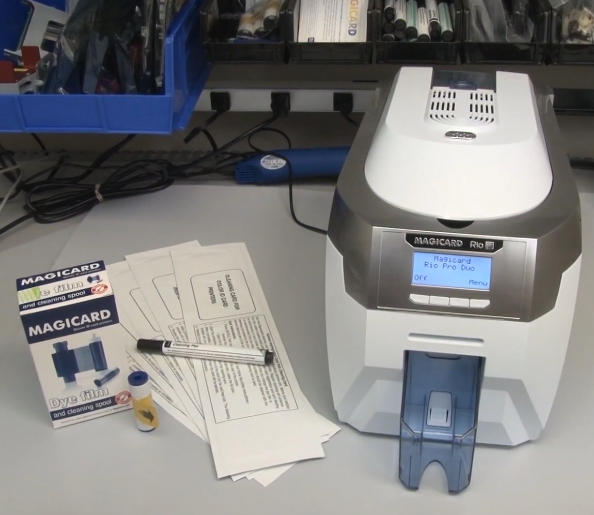
Paso 1: Retire la cinta y el rodillo adhesivo
Comience preparando la impresora para la limpieza.:
- Retire la tolva de tarjetas de la impresora..
- Abra la cubierta de la impresora.
- Retire la cinta de película de tinte existente..
- Retire el rodillo adhesivo azul ubicado debajo de la cinta..
- Retire con cuidado el eje metálico del rodillo azul..
- Coloque el eje de metal en un lugar seguro para reinstalarlo más tarde..
En este punto, la impresora está lista para el proceso de limpieza.
Paso 2: Inicie el proceso de limpieza automática de rodillos
Uso del panel de control de Rio Pro:
- Navegue al menú de la impresora.
- Seleccionar “Rodillos limpios.”
- Siga las instrucciones en pantalla hasta que la impresora indique que está lista..
Próximo:
- Abra el paquete de la tarjeta de limpieza..
- Retire la tarjeta de limpieza..
- Seleccionar “Sí” en la pantalla de la impresora.
- Inserte el extremo estrecho de la tarjeta de limpieza en la ranura para tarjetas frontal..
La impresora arrastrará automáticamente la tarjeta de limpieza a través de la ruta de transporte..
Cómo funciona la tarjeta de limpieza
La tarjeta de limpieza presaturada contiene alcohol isopropílico de alta pureza. (API) que se disuelve y elimina:
- Partículas de polvo
- Residuos de cinta
- Restos de tarjetas
- Aceites y contaminantes
Para una limpieza óptima, Voltee la tarjeta de limpieza y repita el proceso. 2 a 4 veces.
Este sencillo procedimiento mejora drásticamente la limpieza de los rodillos y el rendimiento del transporte de las tarjetas..
Paso 3: Limpiar manualmente los rodillos sucios
Si los rodillos de su impresora están muy contaminados, la limpieza automática puede no ser suficiente.
Limpiar el rodillo de transporte principal
- Salir del modo de limpieza automática.
- Seleccionar “Mover tarjeta” desde el menú principal.
- Dobla la tarjeta de limpieza por la mitad..
- Presione firmemente la tarjeta de limpieza contra el rodillo de transporte central..
- Sostenga uno de los “Mover tarjeta” botones.
- Mueva la tarjeta de limpieza hacia adelante y hacia atrás durante aproximadamente 15 a 20 segundos..
Este proceso de limpieza manual elimina la acumulación de suciedad rebelde que la limpieza automática puede pasar por alto..
Limpiar el rodillo de admisión trasero
Próximo, limpiar el rodillo de alimentación trasero:
- Dar la vuelta a la impresora.
- Mantenga presionado el botón hacia arriba “Mover tarjeta” botón.
- Aplique la tarjeta de limpieza contra el rodillo de entrada trasero..
- Continúe limpiando durante 15 a 20 segundos..
A menudo notarás suciedad y residuos visibles transferidos a la tarjeta de limpieza después de este proceso..
Paso 4: Limpiar el cabezal de impresión Magicard Rio Pro
El cabezal de impresión es el componente más crítico de su impresora y requiere un mantenimiento cuidadoso..
Uso de un lápiz limpiador de cabezales de impresión
Para limpiar el cabezal de impresión:
- Ubique el conjunto del cabezal de impresión.
- Utilice un lápiz limpiador de cabezales de impresión saturado con 99.9% API.
- Limpie suavemente la superficie del cabezal de impresión recubierta de teflón..
- Quitar el polvo, residuo de adhesivo, o contaminación.
Consejos importantes
- Limpie siempre en una dirección suave.
- Evite la presión excesiva.
- Nunca utilice materiales abrasivos..
- Deje que el cabezal de impresión se seque completamente antes de imprimir..
La limpieza regular del cabezal de impresión ayuda a prevenir defectos de impresión y prolonga significativamente la vida útil del cabezal de impresión..
Paso 5: Instale el nuevo rodillo adhesivo
Una vez completada la limpieza:
- Retire el nuevo rodillo adhesivo azul del paquete de la cinta..
- Inserte el eje de metal que quitó anteriormente en el nuevo rodillo..
- Retire todo el envoltorio protector.
- Coloque el rodillo en su posición directamente encima del rodillo naranja hacia la parte posterior de la impresora..
El rodillo adhesivo recoge continuamente el polvo y la suciedad de las tarjetas antes de imprimir., ayudando a proteger el cabezal de impresión.
Paso 6: Instale la nueva cinta de película de tinte
Ahora instale la cinta de repuesto.:
- Retire la nueva cinta de película teñida de su embalaje..
- Retire cualquier envoltorio protector..
- Instale la cinta de acuerdo con la ruta de la cinta de la impresora..
- Verifique que la cinta esté colocada correctamente.
Una vez instalado:
- Cierre la cubierta de la impresora con cuidado..
- Vuelva a instalar la tolva de tarjetas.
- Confirme que la impresora esté lista para funcionar.
Mejores prácticas para el mantenimiento de Magicard Rio Pro
Para maximizar el rendimiento de la impresora:
- Limpie la impresora cada vez que reemplace la cinta..
- Utilice tarjetas de limpieza y bolígrafos de limpieza de cabezales de impresión de alta calidad..
- Guarde las tarjetas en un ambiente limpio.
- Reemplace los rodillos adhesivos con regularidad.
- Evite tocar la superficie del cabezal de impresión..
- Realizar inspecciones de rutina para detectar acumulación de polvo..
Seguir estos procedimientos de mantenimiento puede reducir significativamente los problemas de impresión y mejorar la calidad de la tarjeta..
¿Por qué elegir los suministros de limpieza para impresoras de tarjetas MediTech??
MediTech ofrece soluciones de limpieza profesionales para impresoras de tarjetas de identificación, incluyendo magicard, Evolis, Cebra, tarjetas de datos, Fargo, y otras marcas líderes.
Ventajas de los productos MediTech
- 99.9% Solución de limpieza IPA
- Excelente rendimiento de eliminación de escombros
- Seguro para componentes sensibles de la impresora.
- Compatible con la mayoría de marcas de impresoras de tarjetas.
- Soporte OEM y ODM disponible
- Fabricado bajo sistemas de calidad certificados ISO.
Productos recomendados
- Pluma de limpieza del cabezal de impresión MediTech
- Kits completos de limpieza para impresoras de tarjetas MediTech
- Rodillo de limpieza adhesivo MediTech Magicard
El uso regular de estos productos ayuda a mantener un rendimiento óptimo de la impresora y al mismo tiempo prolonga la vida útil del equipo..