 Sữa gạc bọt, Polyester Swabs, Nhà sản xuất bộ dụng cụ vệ sinh máy in | MediTech
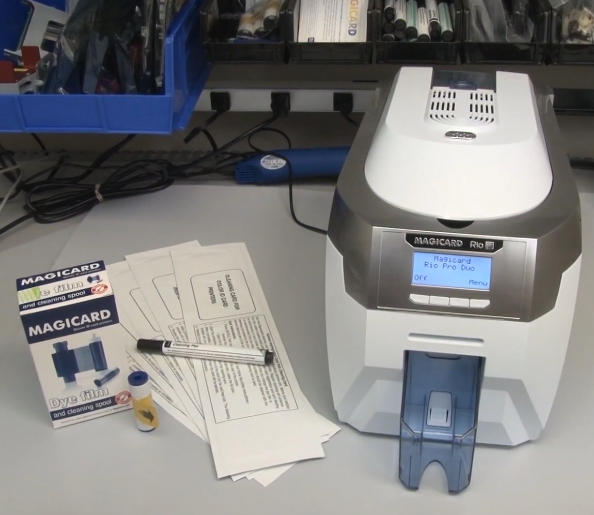
Giữ máy in thẻ ID Magicard Rio Pro của bạn sạch sẽ là điều cần thiết để duy trì chất lượng in cao, kéo dài tuổi thọ máy in, và giảm thời gian ngừng hoạt động tốn kém. Bụi, chất kết dính, mảnh vụn thẻ, và các hạt ruy băng có thể tích tụ bên trong máy in theo thời gian, ảnh hưởng đến việc nạp thẻ, chất lượng hình ảnh, và hiệu suất đầu in.
Magicard khuyên bạn nên vệ sinh máy in Rio Pro mỗi khi thay ribbon phim nhuộm. Trong hướng dẫn này, chúng tôi sẽ hướng dẫn bạn quy trình làm sạch hoàn chỉnh và đề xuất các vật dụng làm sạch chuyên nghiệp từ MediTech để giúp máy in của bạn hoạt động ở hiệu suất cao nhất.
Tại sao việc vệ sinh Magicard Rio Pro thường xuyên lại quan trọng
Bảo dưỡng định kỳ giúp:
- Duy trì sắc nét, in thiệp chất lượng cao
- Ngăn chặn các lỗi và vệt in
- Giảm tình trạng kẹt thẻ và vấn đề nạp thẻ
- Kéo dài tuổi thọ đầu in
- Cải thiện độ tin cậy tổng thể của máy in
- Giảm thiểu việc sửa chữa tốn kém và thời gian ngừng hoạt động
Để có kết quả tốt nhất, làm sạch máy in của bạn mỗi khi bạn cài đặt một dải băng mới.
Dụng cụ cần thiết để làm sạch
Trước khi bắt đầu, chuẩn bị những món sau:
- Thẻ làm sạch Magicard Rio Pro mới
- Bút làm sạch đầu in
- Con lăn làm sạch dính màu xanh mới (đi kèm với mỗi bộ ruy băng)
- Ruy băng màng nhuộm mới
- Máy in Magicard Rio Pro đã bật nguồn
Bước chân 1: Tháo Ruy băng và Con lăn dính
Bắt đầu bằng việc chuẩn bị máy in để vệ sinh:
- Tháo khay đựng thẻ ra khỏi máy in.
- Mở nắp máy in.
- Loại bỏ dải băng nhuộm hiện có.
- Tháo con lăn dính màu xanh nằm bên dưới dải ruy băng.
- Cẩn thận tháo trục kim loại ra khỏi con lăn màu xanh.
- Đặt trục kim loại ở vị trí an toàn để lắp đặt lại sau này.
Tại thời điểm này, máy in đã sẵn sàng cho quá trình làm sạch.
Bước chân 2: Bắt đầu quá trình làm sạch con lăn tự động
Sử dụng bảng điều khiển Rio Pro:
- Điều hướng đến menu máy in.
- Lựa chọn “Con lăn sạch.”
- Làm theo hướng dẫn trên màn hình cho đến khi máy in cho biết đã sẵn sàng.
Tiếp theo:
- Mở gói thẻ vệ sinh.
- Tháo thẻ vệ sinh.
- Lựa chọn “Đúng” trên màn hình máy in.
- Chèn đầu hẹp của thẻ vệ sinh vào khe cắm thẻ phía trước.
Máy in sẽ tự động kéo thẻ vệ sinh qua đường vận chuyển.
Thẻ làm sạch hoạt động như thế nào
Thẻ làm sạch bão hòa trước chứa cồn isopropyl có độ tinh khiết cao (IPA) hòa tan và loại bỏ:
- Hạt bụi
- Dư lượng ruy băng
- mảnh vụn thẻ
- Dầu và chất gây ô nhiễm
Để làm sạch tối ưu, lật thẻ lau lên và lặp lại quy trình 2 ĐẾN 4 lần.
Quy trình đơn giản này cải thiện đáng kể độ sạch của trục lăn và hiệu suất vận chuyển thẻ.
Bước chân 3: Làm sạch con lăn bẩn bằng tay
Nếu trục lăn máy in của bạn bị nhiễm bẩn nặng, làm sạch tự động có thể không đủ.
Làm sạch con lăn vận chuyển chính
- Thoát khỏi chế độ làm sạch tự động.
- Lựa chọn “Di chuyển thẻ” từ menu chính.
- Gấp thẻ lau chùi làm đôi.
- Nhấn chặt thẻ làm sạch vào con lăn vận chuyển trung tâm.
- Giữ một trong những “Di chuyển thẻ” nút.
- Di chuyển thẻ vệ sinh qua lại trong khoảng 15–20 giây.
Quy trình làm sạch thủ công này loại bỏ sự tích tụ bụi bẩn cứng đầu mà quá trình làm sạch tự động có thể bỏ sót.
Làm sạch con lăn nạp phía sau
Tiếp theo, làm sạch con lăn nạp phía sau:
- Xoay máy in xung quanh.
- Nhấn và giữ hướng lên trên “Di chuyển thẻ” cái nút.
- Áp thẻ làm sạch vào con lăn nạp phía sau.
- Tiếp tục làm sạch trong 15–20 giây.
Bạn sẽ thường nhận thấy bụi bẩn và mảnh vụn có thể nhìn thấy được chuyển vào thẻ vệ sinh sau quá trình này.
Bước chân 4: Làm sạch đầu in Magicard Rio Pro
Đầu in là thành phần quan trọng nhất của máy in và cần được bảo trì cẩn thận.
Sử dụng bút làm sạch đầu in
Để làm sạch đầu in:
- Xác định vị trí lắp ráp đầu in.
- Sử dụng bút làm sạch đầu in đã thấm đẫm 99.9% IPA.
- Lau nhẹ nhàng trên bề mặt đầu in được phủ Teflon.
- Loại bỏ mọi bụi bẩn, chất kết dính, hoặc ô nhiễm.
Lời khuyên quan trọng
- Luôn làm sạch theo một hướng trơn tru.
- Tránh áp lực quá mức.
- Không bao giờ sử dụng vật liệu mài mòn.
- Để đầu in khô hoàn toàn trước khi in.
Vệ sinh đầu in thường xuyên giúp ngăn ngừa lỗi in và kéo dài tuổi thọ đầu in đáng kể.
Bước chân 5: Lắp con lăn dính mới
Sau khi dọn dẹp xong:
- Lấy con lăn dính màu xanh mới ra khỏi gói ruy băng.
- Lắp trục kim loại đã tháo trước đó vào con lăn mới.
- Loại bỏ tất cả các lớp bọc bảo vệ.
- Đưa con lăn vào vị trí ngay phía trên con lăn màu cam về phía sau máy in.
Con lăn dính liên tục thu gom bụi và mảnh vụn từ thẻ trước khi in, giúp bảo vệ đầu in.
Bước chân 6: Lắp Ruy băng màng nhuộm mới
Bây giờ cài đặt ribbon thay thế:
- Tháo dải ruy băng màng thuốc nhuộm mới ra khỏi bao bì của nó.
- Loại bỏ mọi lớp bọc bảo vệ.
- Cài đặt ribbon theo đường dẫn ribbon của máy in.
- Xác minh ribbon được đặt đúng vị trí.
Sau khi cài đặt:
- Đóng nắp máy in nhẹ nhàng.
- Cài đặt lại khay đựng thẻ.
- Xác nhận máy in đã sẵn sàng hoạt động.
Thực hành tốt nhất để bảo trì Magicard Rio Pro
Để tối đa hóa hiệu suất máy in:
- Vệ sinh máy in mỗi khi thay ribbon.
- Sử dụng thẻ vệ sinh và bút vệ sinh đầu in chất lượng cao.
- Bảo quản thẻ ở môi trường sạch sẽ.
- Thay con lăn dính thường xuyên.
- Tránh chạm vào bề mặt đầu in.
- Thực hiện kiểm tra định kỳ để phát hiện bụi tích tụ.
Thực hiện theo các quy trình bảo trì này có thể giảm đáng kể các vấn đề in ấn và cải thiện chất lượng thẻ.
Tại sao nên chọn Thiết bị vệ sinh máy in thẻ MediTech?
MediTech cung cấp giải pháp vệ sinh máy in CMND chuyên nghiệp, bao gồm cả Magicard, Evolis, Ngựa vằn, Datacard, Fargo, và các thương hiệu hàng đầu khác.
Ưu điểm sản phẩm MediTech
- 99.9% Dung dịch làm sạch IPA
- Hiệu suất loại bỏ mảnh vụn tuyệt vời
- An toàn cho các bộ phận máy in nhạy cảm
- Tương thích với hầu hết các thương hiệu máy in thẻ
- Hỗ trợ OEM và ODM có sẵn
- Được sản xuất theo hệ thống chất lượng được chứng nhận ISO
Sản phẩm được đề xuất
- Bút làm sạch đầu in MediTech
- Bộ dụng cụ vệ sinh máy in thẻ hoàn chỉnh của MediTech
- Con lăn làm sạch dính MediTech Magicard
Việc sử dụng thường xuyên các sản phẩm này giúp duy trì hiệu suất máy in tối ưu đồng thời kéo dài tuổi thọ thiết bị.