 クリーンルーム用フォームスワブ, ポリエステル綿棒, プリンタークリーニングキットメーカー | MediTech
Magicard Rio Pro ID カード プリンタを清潔に保つことは、高い印刷品質を維持するために不可欠です, プリンターの寿命を延ばす, コストのかかるダウンタイムを削減. ほこり, 接着剤の残留物, カードデブリ, リボンの粒子は時間の経過とともにプリンター内に蓄積する可能性があります, カード送りに影響を与える, 画質, プリントヘッドの性能.
Magicard では、染料フィルム リボンを交換するたびに、Rio Pro プリンタをクリーニングすることをお勧めします。. このガイドでは, 完全なクリーニングプロセスをご案内し、プリンターを最高のパフォーマンスで動作し続けるために、MediTech のプロ仕様のクリーニング用品をお勧めします。.
Magicard Rio Pro の定期的なクリーニングが重要な理由
定期的なメンテナンスが役に立ちます:
- シャープさを維持する, 高品質なカード印刷
- 印刷欠陥やスジを防ぐ
- カード詰まりや給紙の問題を軽減
- プリントヘッドの寿命を延ばす
- プリンター全体の信頼性を向上させる
- 高価な修理とダウンタイムを最小限に抑える
最良の結果を得るために, 新しいリボンを取り付けるたびにプリンターを掃除します.
掃除に必要な道具
始める前に, 以下の物を準備します:
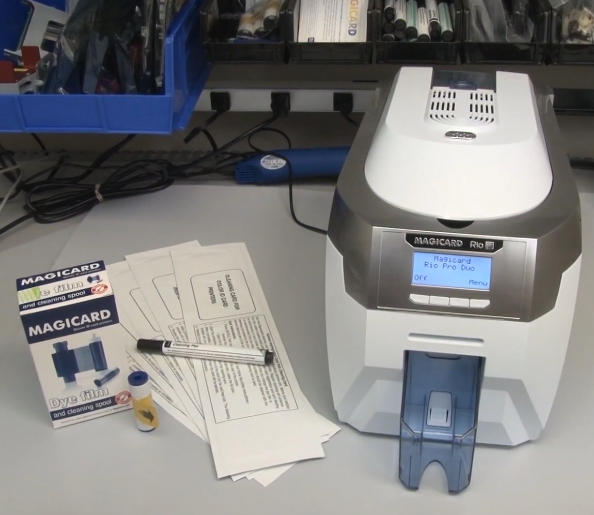
- 新しい Magicard Rio Pro クリーニング カード
- プリントヘッド クリーニング ペン
- 新しい青色の粘着性クリーニング ローラー (各リボンキットに付属)
- 新しい染料フィルムリボン
- Magicard Rio Pro プリンタの電源が入っています
ステップ 1: リボンと粘着ローラーを取り外します
プリンターのクリーニングの準備から始めます:
- プリンターからカードホッパーを取り外します.
- プリンターカバーを開く.
- 既存の色素フィルムリボンを取り外します.
- リボンの下にある青い粘着ローラーを取り外します。.
- 金属シャフトを青いローラーから慎重に取り外します。.
- 後で再取り付けできるように金属シャフトを安全な場所に置きます.
この時点で, プリンターはクリーニングプロセスの準備ができています.
ステップ 2: 自動ローラークリーニングプロセスを開始する
Rio Pro コントロール パネルの使用:
- プリンターメニューに移動します.
- 選択する “ローラーを掃除します。”
- プリンターが準備完了を示すまで、画面上の指示に従います。.
次:
- クリーニングカードのパッケージを開ける.
- クリーニングカードを取り外します.
- 選択する “はい” プリンターのディスプレイ上で.
- クリーニング カードの細い方の端を前面のカード スロットに挿入します。.
プリンターは自動的にクリーニング カードを搬送経路に引き込みます。.
クリーニングカードの仕組み
あらかじめ飽和させたクリーニングカードには高純度のイソプロピルアルコールが含まれています (IPA) 溶解して除去するもの:
- 粉塵粒子
- リボンの残り
- カードの破片
- 油と汚染物質
最適な洗浄のために, クリーニングカードを裏返してプロセスを繰り返します 2 に 4 時間.
この簡単な手順により、ローラーの清浄度とカードの搬送パフォーマンスが大幅に向上します。.
ステップ 3: 汚れたローラーを手動で掃除する
プリンターのローラーがひどく汚れている場合, 自動クリーニングでは十分ではない可能性があります.
メイン搬送ローラーの清掃
- 自動クリーニングモードを終了する.
- 選択する “カードを移動する” メインメニューから.
- クリーニングカードを半分に折ります.
- クリーニングカードを中央の搬送ローラーにしっかりと押し付けます.
- いずれかを保持し、 “カードを移動する” ボタン.
- クリーニング カードを約 15 ~ 20 秒間前後に動かします。.
この手動洗浄プロセスにより、自動洗浄では見逃される頑固な汚れの蓄積が除去されます。.
後部吸気ローラーを掃除する
次, 後面給紙ローラーを掃除する:
- プリンターの向きを変える.
- 上向きを長押しします “カードを移動する” ボタン.
- クリーニングカードを後部吸気ローラーに当てます.
- 15 ~ 20 秒間洗浄を続けます.
このプロセスの後、目に見える汚れや破片がクリーニング カードに転写されていることに気づくことがよくあります。.
ステップ 4: Magicard Rio Pro プリントヘッドのクリーニング
プリントヘッドはプリンタの最も重要なコンポーネントであり、慎重なメンテナンスが必要です.
プリントヘッド クリーニング ペンの使用
プリントヘッドをクリーニングするには:
- プリントヘッド アセンブリの位置を確認します.
- インクを染み込ませたプリントヘッド クリーニング ペンを使用してください。 99.9% IPA.
- テフロンコーティングされたプリントヘッドの表面を優しく拭きます。.
- ほこりを取り除きます, 接着剤の残留物, または汚染.
重要なヒント
- 常に滑らかな一方向に掃除してください.
- 過度の圧力を避ける.
- 研磨材は絶対に使用しないでください.
- 印刷する前にプリントヘッドを完全に乾燥させます.
定期的にプリントヘッドをクリーニングすると、印刷欠陥が防止され、プリントヘッドの寿命が大幅に延長されます。.
ステップ 5: 新しい粘着ローラーを取り付けます
掃除が終わったら:
- 新しい青色の粘着ローラーをリボン パッケージから取り出します。.
- 先ほど外した金属シャフトを新しいローラーに差し込みます.
- 保護包装をすべて取り外します.
- プリンターの後部に向かって、オレンジ色のローラーの真上の位置にローラーをはめ込みます。.
粘着ローラーは印刷前にカードから塵や破片を継続的に収集します。, プリントヘッドの保護に役立ちます.
ステップ 6: 新しい染料フィルム リボンを取り付けます
交換用のリボンを取り付けます:
- 新しい染料フィルム リボンをパッケージから取り出します。.
- 保護包装をすべて取り外します.
- プリンターのリボン経路に従ってリボンを取り付けます.
- リボンが正しく装着されていることを確認します.
インストールしたら:
- プリンターカバーを静かに閉めます.
- カードホッパーを再度取り付けます.
- プリンターが動作可能な状態であることを確認する.
Magicard Rio Pro メンテナンスのベスト プラクティス
プリンターのパフォーマンスを最大限に高めるには:
- リボンを交換するときは必ずプリンタを清掃してください.
- 高品質のクリーニング カードとプリントヘッド クリーニング ペンを使用する.
- カードは清潔な環境で保管してください.
- 粘着ローラーを定期的に交換する.
- プリントヘッドの表面に触れないようにする.
- 粉塵の蓄積がないか定期的に点検してください.
これらのメンテナンス手順を実行すると、印刷の問題が大幅に軽減され、カードの品質が向上します。.
MediTech カード プリンターのクリーニング用品を選ぶ理由?
MediTech は ID カード プリンター用の専門的なクリーニング ソリューションを提供します, マジカードを含む, エボリス, シマウマ, データカード, ファーゴ, およびその他の主要ブランド.
メディテック製品の利点
- 99.9% IPA洗浄液
- 優れたゴミ除去性能
- 敏感なプリンターコンポーネントにも安全
- ほとんどのカード プリンター ブランドと互換性があります
- OEM および ODM サポートが利用可能
- ISO認定の品質システムの下で製造されています
おすすめ商品
これらの製品を定期的に使用すると、プリンターの最適なパフォーマンスを維持しながら、機器の寿命を延ばすことができます。.